/ HELP — 2 min read
How to cancel your Echorank subscription
Canceling takes about a minute and is entirely self-serve — no email, no phone call, no retention hoops.
Canceling takes about a minute and is entirely self-serve — no email, no phone call, no retention hoops.
Steps
- Sign in to your Echorank account.
- In the left sidebar, go to Billing.
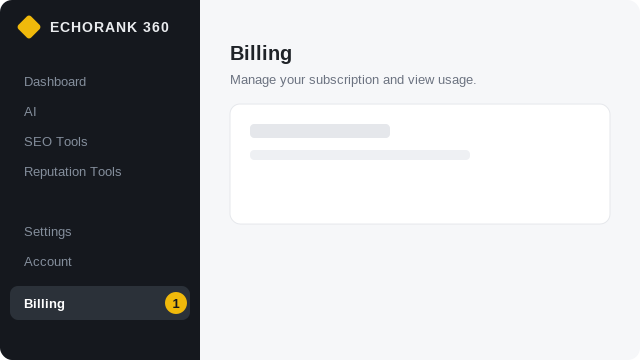
- On your plan card, click Cancel subscription.
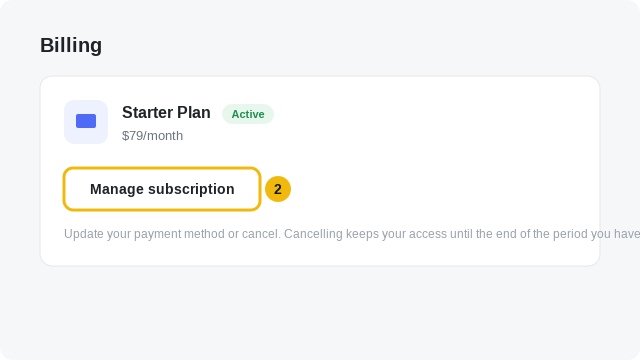
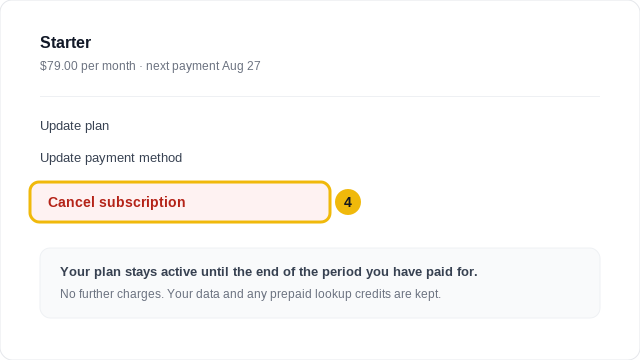
- The next page shows when your access ends and confirms you won't be charged again. Giving a reason is optional. Click Cancel subscription.
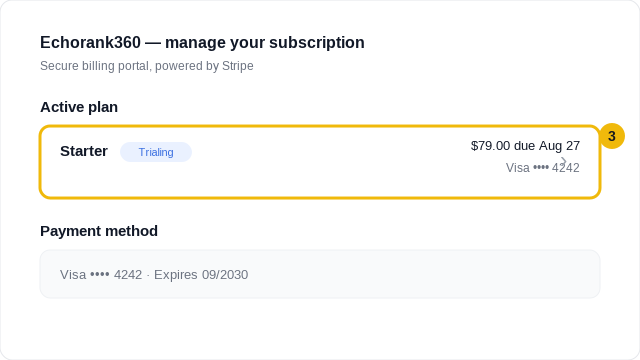
- Back on Billing, your plan card reads Cancelled — access until your end date.
What happens after you cancel
- Your plan stays fully active until the end of the period you've already paid for (or until your trial's end date, if you cancel during a trial). You are not charged again.
- There are no cancellation fees.
- Changed your mind? Click Resume subscription on the Billing page any time before that date. It is one click, and nothing has to be entered again.
- Your workspace data — audits, tracked prompts, reports, settings — is kept, so if you come back everything is where you left it.
- Any prepaid lookup credits remain on your account and become usable again if you reactivate a subscription.
- After the end date, you can subscribe again any time from Billing → Plans.
Canceling during your free trial
Same steps. Cancel any time before the trial ends and you will not be charged at all. You keep the trial until its end date.
Who can cancel
The account owner. Admins and other team members see who can cancel instead of the button.
Need help?
If anything doesn't work, contact support and we'll cancel it for you — the self-serve path is a convenience, not a requirement.
Back to Knowledge Hub